EDI Validation API (New in 2.15)
Overview
The EDI Converter can validate EDI files against the X12 EDI standard, including interchange-level and transaction-level checks, required and optional segments and elements, data element types, healthcare code validity, and more.
The specific validations are organized by SNIP level, as described below. In the current release, the converter provides full support for SNIP Levels 1, 2, 3, and 5.
The converter creates a validation issue object for each validation failure. The object includes the EDI loop, segment, element, failing value, human-readable message, and source location in the original EDI file.
Example:
{
  "objectType" : "VALIDATION",
  "issueType" : "VALUE_NOT_IN_ENUM_LIST",
  "issueObjectClass" : "Claim",
  "fieldName" : "providerSignatureIndicator",
  "sourceLocation" : {
    "fileName" : "837P-validation-issues.edi",
    "lineNumber" : 19,
    "segmentNumber" : 19
  },
  "loop" : "2300",
  "segment" : "CLM",
  "element" : "CLM06",
  "value" : "V",
  "ediString" : "CLM*26463774*100***111:B:1*V*A*Y*I~",
  "message" : "Value 'V' is not in the allowed values list",
  "allowedValues" : [ "Y", "N" ]
}
Each claim, payment, and member coverage object contains a list of validation issues related to that object. Validation issues that are not related to a specific data object are reported at the root of the conversion stream: either in the enclosing array for JSON output or as a separate line for NDJSON output.
See an example in the 837P validation output.
The converter never fails the conversion process if validation fails. It continues with the conversion and reports the validation issues.
Invalid values may be set to null in the conversion output, for example when a date value cannot be parsed as a date. If a segment is not valid, such as when it appears in a loop where it is not allowed, the converter skips that segment and continues with the next one.
Validation API
To validate while converting, set the validate parameter to true on the api/edi/json endpoint. The converter returns the converted output and includes validation issues in the response.
You can also make the validation mode the default by setting the EDI_VALIDATE environment variable to True.
To validate without returning conversion results, use the api/edi/validate endpoint. This endpoint returns only validation issues.
curl -H "Content-Type: text/plain" --data-binary @../edi_files/837/837P-validation-issues.edi \
"$SERVER_URL/api/edi/validate"
See the validation-only output example.
You can also use our public API to validate EDI files. Use your license key as the API key (X-API-Key header):
export API_KEY="Ic5OXgAAABoAAAACAAAACwAAAANlbnRpdGxlbWVudEVESQAAABoAAAALAAAACmV4cGlyYXRpb24AAAGdIyY2AAAAAJwAAAABAAAAEAAAAIBsaWNlbnNlU2lnbmF0dXJlNNiFGndeVeM9X4kxO9SFf7U0Gq7K9LLKEKPEhW5TTqZvFEB2QyKb1A7/8BjddgIZUAnNxRSykCMj6u34YlBeibVwkHqyg2p31qHRwYGtVO4O6YTEsveZ15gH5yOS1vZI6ztxI7MWsOXn7bupiezerY4/0MLMHuWqC6V1+kQVVLQAAAAiAAAAAgAAAA8AAAAHc2lnbmF0dXJlRGlnZXN0U0hBLTUxMg=="
curl -H "Content-Type: text/plain" -H "X-Api-Key: $API_KEY" \
--data-binary @../edi_files/837/837P-validation-issues.edi \
"https://datainsight.health/clinsight/api/edi/validate"
Do not submit PHI (personally identifiable information) in the EDI file.
Processing Validation Issues
To process validation issues, iterate over the objects in the conversion stream and check the object type for root-level issues.
Also check the validationIssues array on each claim, payment, and member coverage object:
if claim.validation_issues:
    print(f'Validation issues for claim {claim.patient_control_number}:')
    for issue in claim.validation_issues:
        print(issue)
See the complete Python 837 conversion example.
Validation to Text
It is often useful to see validation issues next to the original EDI segment.
Use the api/edi/validate/text endpoint to submit an EDI file and return text output. Validation issues are marked with !! under each EDI segment that failed validation.
Example output:
CLM*26463774*100***111:B:1*V*A*Y*I~
!!Loop:2300, Element:CLM05-1, Field: facility_type_code | Place of Service 111 is not a valid code
!!Loop:2300, Element:CLM05-1, Field: facility_type_code | Length of '111' is greater than the maximum length 2
!!Loop:2300, Element:CLM06, Field: Claim.providerSignatureIndicator | Value 'V' is not in the allowed values list. Allowed values: [Y, N]
!!Loop:2300, Segment:CLM, Field: Claim.chargeAmount | Claim 26463774: The sum of line charge amounts 99.00 does not match the claim charge amount 100.00
DTP*314*RD8*20051208-20051309~
!!Loop:2300, Segment:DTP, Field: disability_date_to | Invalid date or time value '20051309'
DTP*471*D8*20051301~
!!Loop:2300, Segment:DTP, Field: prescription_date | Invalid date or time value '20051301'
See the complete text validation output example.
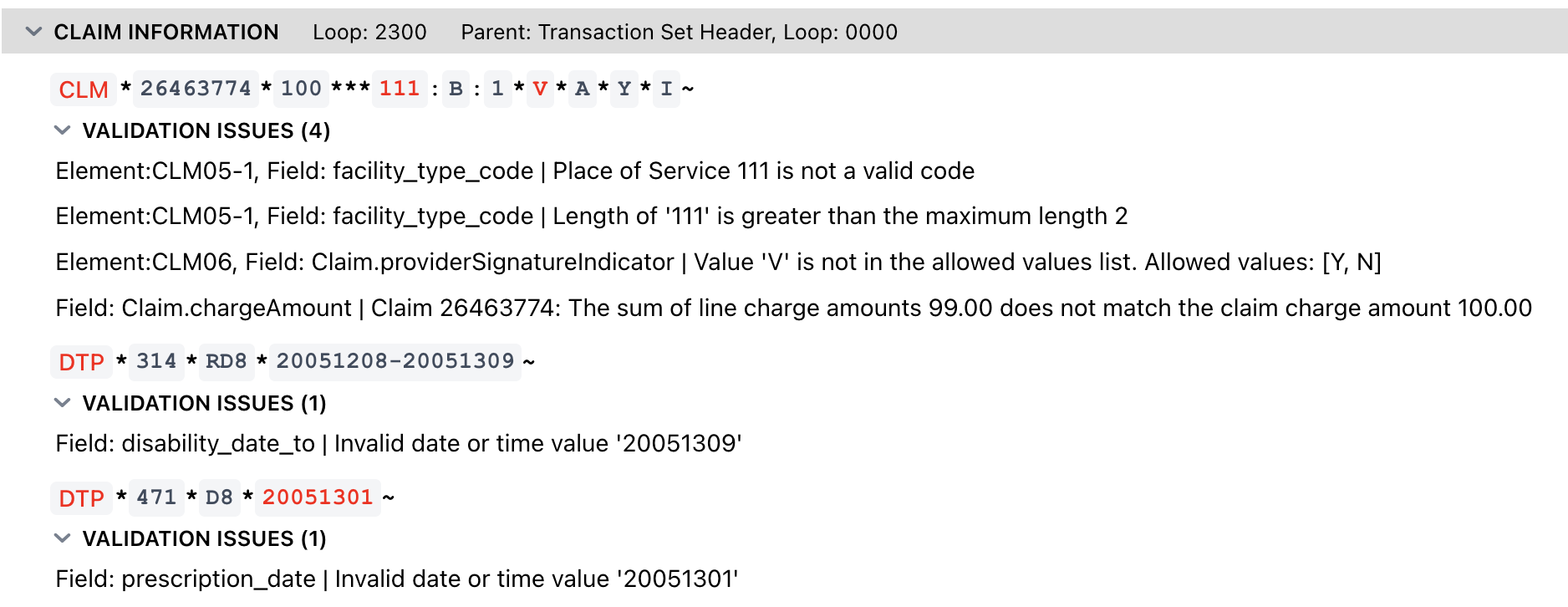
Using EDI Viewer to Validate EDI Files
You can also use the bundled EDI Viewer to validate EDI files. The viewer highlights invalid segments and elements in red and prints validation issues under each segment, similar to the converter’s text validation output.
Validation Issue Object Schema
| Name | Description | Type |
|---|---|---|
objectType | Type of this object, always 'VALIDATION' | String |
issueType | Issue type Values: BALANCE, CONTROL, INVALID, INVALID_CODE, LENGTH_EXCEEDED, LENGTH_TOO_SHORT, MISMATCH, NOT_ALLOWED, NUMBER_OF_ITEMS, REQUIRED, REQUIRED_CODE, VALUE_NOT_IN_ENUM_LIST, WRONG_TYPE | String (enum) Required |
issueObjectClass | Class (type) of the object where the issue was detected, such as Claim, ServiceLine, etc. | String |
jsonPath | JSON path for the object where the issue was detected | String |
fieldName | Field name or element name | String |
sourceLocation | Location of the issue in the EDI file | |
loop | EDI loop where the issue was found | String |
segment | EDI segment ID | String |
element | EDI element designator | String |
ediCode | EDI qualifier or code for the segment if the segment is uniquely identified by the code | String |
maxNumberOfItems | Maximum number of items allowed for the segment, list, or loop | Integer |
actualNumberOfItems | Actual number of items | Integer |
length | Expected length of the element's value (LENGTH_TOO_SHORT, LENGTH_EXCEEDED issue types) | Integer |
actualLength | Actual length (LENGTH_TOO_SHORT, LENGTH_EXCEEDED issue types) | Integer |
dataType | Expected data type (WRONG_TYPE issue type) Values: BINARY, COMPOSITE, DATE, DECIMAL, ENUM, IDENTIFIER, NUMERIC, STRING, TIME | String (enum) |
actualDataType | Actual data type (WRONG_TYPE issue type) Values: BINARY, COMPOSITE, DATE, DECIMAL, ENUM, IDENTIFIER, NUMERIC, STRING, TIME | String (enum) |
codeSubType | Type of the code that failed validation (INVALID_CODE issue type), such as HCPCS, ProviderTaxonomy, ICD_10 | String |
value | The value that caused the validation to fail | String |
ediString | Value that caused the issue | String |
message | Additional message describing the issue | String |
allowedValues | Allowed values (VALUE_NOT_IN_ENUM_LIST issue type) | List of String |
Source Location
| Name | Description | Type |
|---|---|---|
fileName | File name | String |
lineNumber | Line number in the file | Integer |
segmentNumber | Global segment number in the file, starting from 1 | Integer |
EDI Validation SNIP Levels
SNIP Level 1 - Interchange and Envelope Validation
Validates the basic structure of the EDI interchange, including ISA/IEA, GS/GE, and ST/SE segments.
This level ensures:
- Proper segment structure and delimiters
- Required envelope segments are present
- Control numbers match between header and trailer segments
- Basic syntax correctness of the interchange
SNIP Level 2 - HIPAA Implementation Guide Syntax Validation
Validates the transaction against the HIPAA implementation guide for syntax and structure.
This level ensures:
- Required segments and elements are present
- Data elements conform to correct data types and formats
- Segment usage complies with the implementation guide
- Repeating segments and loops follow defined rules
SNIP Level 3 - Balancing Validation
Validates that numeric values within the transaction are internally consistent.
This level ensures:
- Totals match the sum of individual line items
- Financial balances are correct (e.g., claim totals, payment amounts)
- Quantity and count fields reconcile properly
SNIP Level 4 - Situational Validation
Validates situational rules defined in the implementation guide.
This level ensures:
- Required fields are present when specific conditions are met
- Conditional elements follow if/then logic
- Situational usage rules are properly enforced
SNIP Level 5 - External Code Set Validation
Validates that data elements contain valid values from external code sets.
This level ensures:
- Codes (e.g., CPT, ICD, HCPCS, NDC) are valid
- Code values are active and appropriate for the transaction date
- Standardized code sets are used where required
The converter does not validate AMA CPT codes by default. You need an AMA CPT license to enable CPT validation.