Claim Insight/EDI Viewer 2.15.5 Release: Easier Filtering and Expanded Dashboards
We’re pleased to announce version 2.15.5 of Claim Insight/EDI Viewer.
This release makes filtering easier, adds new metrics to the 835 and 837 dashboards, and improves search and sorting performance on large datasets.
New Place of Service Filter
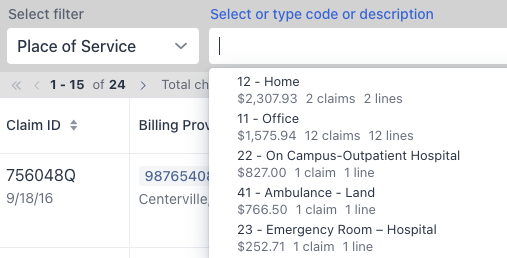
You can now filter both 837 claims and 835 payments by Place of Service. The built-in lookup lets you find a place of service by code or description, making it easy to narrow your results to settings such as office, home, or outpatient hospital.
Easier Filter Controls
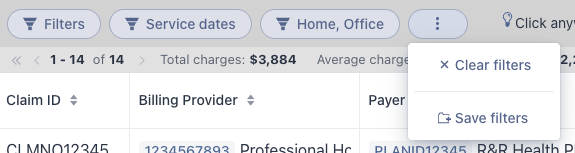
The claims and payments list views now put Clear filters and Save filters together in the list’s actions menu. Clear all active filters or save the current filter combination with a single click on the corresponding action.
Each filter dialog also includes a Clear button, so you can reset that filter directly in the dialog.
Expanded 835 Payment Dashboard
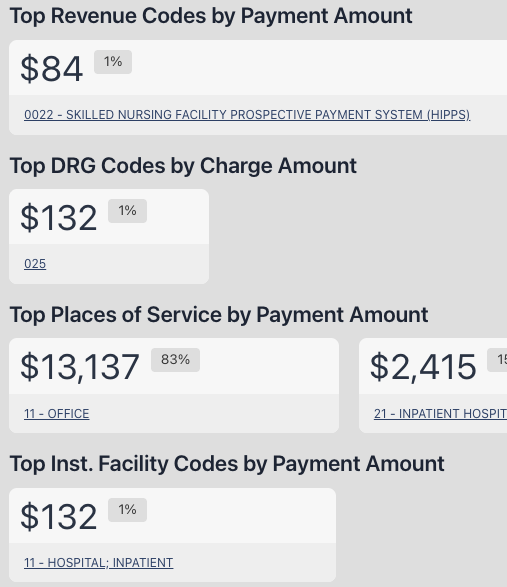
The 835 payment dashboard now includes four additional breakdowns:
- Top Revenue Codes by Payment Amount for institutional claims.
- Top DRG Codes by Charge Amount for institutional claims.
- Top Places of Service by Payment Amount.
- Top Institutional Facility Codes by Payment Amount.
These metrics give you more ways to review payments by service category and care setting, along with charges by diagnosis-related group (DRG).
Updated 837 Claim Dashboard
The 837 claim dashboard now displays Top Place of Service Codes and Top Institutional Facility Codes separately. Previously combined in one breakdown, these codes are now easier to review independently.
We’ve also added Top DRG Codes for institutional claims.
Other Improvements
- Refined spacing throughout the interface fits more information on screen and reduces scrolling.
- Improved search and sorting performance helps you work more efficiently with large datasets.
- Several bug fixes improve everyday use.
Explore the full product or start a free trial on the Claim Insight/EDI Viewer page.